Where the hooks fit in your flow
One commit, start to finish, with every place a hook steps in.
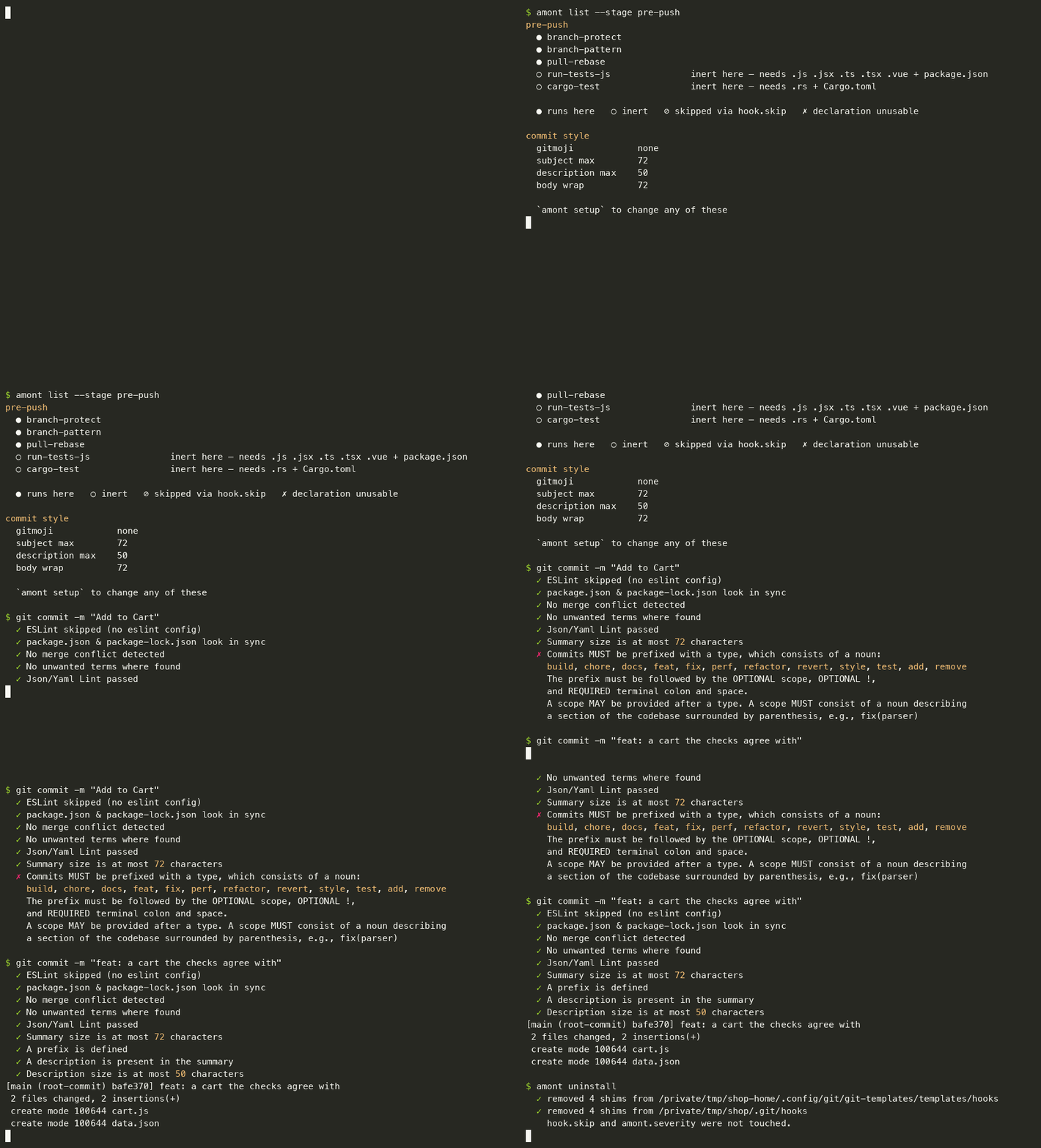
You hit git commit
If you set commit.template, the
footer scaffold
opens in your editor to help you write something meaningful. Or you are in a
hurry and write git commit -m "Add to Cart", which is the interesting case,
because that is the one that gets stopped.
pre-commit
Git runs it before the commit exists. Every pre-commit check that applies here fans out concurrently, each reporting its own line, and a panic in one is isolated so the others still report.
On an interactive terminal you watch this happen: a live region shows one
spinner line per check still running (⠹ clippy 2.3s), shrinking as they
finish, while each finished check's full output lands above it as one
contiguous block — never interleaved with another check's, however many run
at once. Piped or in CI the region stays silent and only the blocks appear.
git config amont.progress false restores plain streaming output.
Most of them will say nothing, because most are inert in any given repository:
a check fires only when the commit touches files it understands and the
repository carries the configuration that opts into that tool. amont list
tells you which ones are live where you are standing.
Some checks fix rather than complain — cargo fmt, prettier, ruff —
and stage the result. What exactly they are allowed to touch, and how your
unstaged work survives it, is the subject of
index fidelity and run modes; it is the most
carefully argued part of this codebase, because the failure it guards against
is losing work you had not committed.
If a blocking check fails, the commit is aborted and nothing has happened.
commit-msg
Then git hands the message to commit-msg, which lints it against the
conventions, wraps the body at 72 columns and groups
the footers.
This is the hook that rejects Add to Cart: no type prefix. git commit -m "feat: a cart the checks agree with" passes.
--no-verify skips commit-msg along with pre-commit — that is git's
behaviour — but neither hook.skip nor a severity override names it, so
there is no way to turn it down and leave it on. So this is the one
hook whose rules are adjustable in themselves: amont setup sets the
subject and description limits, the body wrap, and where the type's gitmoji
goes (nowhere, by default).
git push
pre-push runs its checks in sequence, cheapest and most decisive
first — refuse a forbidden push before validating a branch name, and validate
everything structural before paying for a test suite.
It refuses a direct push to main or master; it requires a branch name of
the form feat/3002-image-crop, unless the branch is already on the remote; it
rebases your branch onto its own upstream, never onto the default branch,
and never when your tree is dirty; and then it runs the test suite of whatever
your commits actually touched.
By default that suite runs against your working tree, and says so — which
is fast, and is not what you are pushing. git config amont.testPushedTree true runs it against a throwaway checkout of the
commits being pushed instead. See the checks.
Where a check can only recommend rather than act, it recommends. pull-rebase
warns when the default branch has moved ahead of you; it does not go and do
anything about it.
Asking the same questions without committing
The hooks are not the only way to run the checks, and during adoption they are the wrong way:
amont run                 # would my commit pass? (the staged set)
amont run --all-files     # does my working tree pass? (git ls-files)
amont run pre-commit-prettier
Those two questions differ on purpose. --all-files on a dirty tree reports on
content that is not committed and may never be — which is exactly what you want
when adopting a check into an existing repository, where git add . is not an
acceptable way to measure the mess.
amont rehearse --wait asks the push question early: it runs the push gate on
a snapshot of HEAD before git opens a connection and stamps the tree, so the
git push that follows skips the suite. amont restore brings back unstaged
work a killed hook left parked.
For coding agents
amont list --json is the same answer as amont list, machine-readable:
declared and effective severity, whether each check fires here and why not,
and the command if it is a declared external. --stage filters to one
trigger, --pushed scopes to what your next push would carry. The contract is
described in the checks.
amont agents-md writes that guidance into a generated block in AGENTS.md,
plus a CLAUDE.md signpost pointing at it; amont agents-md --check reports
drift only, and the pre-commit-agents-md check warns when the block is behind
the binary that would generate it now.
Before you type git commit at all
Everything above happens once the work is finished, staged, and described. That
is the latest possible moment to learn that line 7 has a debugger; in it.
amont check asks about files instead of about a commit:
amont check src/app.js                          # a path
amont check src/*.ts --format json              # several, structured
amont check --stdin-filename src/app.js < buf   # a buffer you have not saved
src/app.js:7:3: error: 'debugger' is a banned term here [ban-terms]
src/app.js:41: error: an AWS access key id — unstage it; once pushed it is not
history, it is an incident [secrets]
It is a read: no index, no staging, no stash, no writes. Exit 1 if anything blocking was found, 0 otherwise — a warning is not a failure.
Only the content checks answer here — ban-terms, secrets, merge-conflict,
large-files. branch-pattern and pull-rebase are not about a file, and
clippy, ruff and eslint already talk to your editor better than anything
proxied through amont could.
Wiring it to an editor
file:line:col: severity: message is the format every editor's error parser
already reads, so there is no amont plugin to install — anywhere.
Neovim, with nvim-lint:
require("lint").linters.amont = {
  cmd = "amont",
  stdin = true,
  args = { "check", "--stdin-filename", function() return vim.fn.expand("%:p") end },
  ignore_exitcode = true,          -- exit 1 means "found something", not "broke"
  -- `col` is optional: a whole-file finding (large-files) has no column, and
  -- `secrets` reports a line without one.
  parser = require("lint.parser").from_pattern(
    "([^:]+):(%d+):?(%d*): (%w+): (.+)",
    { "file", "lnum", "col", "severity", "message" },
    { error = vim.diagnostic.severity.ERROR, warning = vim.diagnostic.severity.WARN }
  ),
}
require("lint").linters_by_ft = { javascript = { "amont" }, rust = { "amont" } }
VS Code, as a task with a problem matcher:
{
  "label": "amont check",
  "type": "shell",
  "command": "amont check ${file}",
  "problemMatcher": {
    "owner": "amont",
    "fileLocation": ["relative", "${workspaceFolder}"],
    "pattern": {
      "regexp": "^(.+?):(\\d+):?(\\d*): (error|warning): (.+)$",
      "file": 1, "line": 2, "column": 3, "severity": 4, "message": 5
    }
  }
}
Anything else —
efm-langserver and Emacs
flycheck both take the same pattern. --format json (amont-check-v1) is
there if you would rather not parse a line.