Installing and activating
Two separate acts, and keeping them separate is deliberate. Installing the binary puts a program on your machine. Activating turns hooks on in a repository. Nothing about the first does the second.
1. Get the binary
Linux and macOS:
curl -fsSL https://raw.githubusercontent.com/fredericrous/amont/main/install/install.sh | sh
Windows, in PowerShell — the line above is POSIX sh, so on Windows it runs
only under Git Bash:
irm https://raw.githubusercontent.com/fredericrous/amont/main/install/install.ps1 | iex
The installer resolves the latest release, downloads the archive for your
platform, verifies it against the published SHA256SUMS, and writes the binary
to $AMONT_BIN_DIR (default ~/.local/bin) by atomic rename, so a
half-copied amont never exists.
It refuses to guess. If the checksum does not match it exits rather than
installing; if SHA256SUMS is missing or there is no sha256 tool on the
machine it says loudly that the download was not verified rather than
staying quiet about it. Verifying what this binary is before putting it in a
position to read every staged file is the argument the project makes about its
own dependencies, applied to itself.
The checksum is not the whole story, though. SHA256SUMS comes from the same
release as the archives it describes, so it proves the download is intact —
not that the release was built by this repository. Every release artifact,
SHA256SUMS included, also carries a GitHub build attestation, and that is
the check the installer does not run for you, because it needs the gh
CLI or a Sigstore client:
gh attestation verify amont-<version>-<target>.tar.gz --repo fredericrous/amont
See SECURITY.md for what each check does and does not prove.
~/.local/bin is not an arbitrary default: it is a candidate in the shim's
own resolution order, so a binary there is found even by a shim whose baked
path is wrong — and it is the same convention systemd, pipx and uv observe.
Where the binary ends up
amont install copies the running binary somewhere stable and bakes that
path into every shim it writes — unless the binary is already on your
PATH, in which case it bakes it where it is and copies nothing.
That split matters for package managers. ./target/release/amont install
must copy, because cargo clean deletes that directory and the shims would
stop resolving. A binary from brew install, cargo install or a distro
package must not be copied: the copy is a second, unmanaged binary that the
package manager will never update again, so brew upgrade amont refreshes
one file while every repository stays baked to a frozen one. That is the same
staleness the copy exists to prevent, arrived at from the other side.
The path baked for a package-managed binary is the one PATH exposes, not
the resolved one. Homebrew's /usr/local/bin/amont is a symlink into
/usr/local/Cellar/amont/<version>/bin/, and that versioned directory is
deleted on the next upgrade — baking it would pin every repository to a path
about to stop existing. The same is true of nix, asdf and mise.
Installing somewhere else
$AMONT_BIN_DIR moves the binary, and install bakes wherever it landed
into the shims it writes — so a custom location resolves through the baked path
and needs nothing further.
The exception is the setup where shims are deliberately left unbaked:
init.templateDir pointed at a checkout. Those shims resolve at run time from
~/.local/bin, which is a constant inside a POSIX sh file. Choose both and
they stop composing — nothing baked a path, and the one path the shims know is
not where the binary went. amont install says so when it sees the
combination, and offers the two ways out: link the binary where the shims look,
or set $GIT_HOOKS_BIN.
$AMONT_BIN_DIR is an install-time setting only; the shim never reads it.
The runtime override is $GIT_HOOKS_BIN — one variable able to redirect which
binary executes on every commit is enough surface.
Pin a version, or install elsewhere:
AMONT_VERSION=v1.0.0 AMONT_BIN_DIR=~/bin \
  curl -fsSL https://raw.githubusercontent.com/fredericrous/amont/main/install/install.sh | sh
Without the installer
Download an archive and its checksum from
Releases. Prebuilt
targets: x86_64-unknown-linux-gnu, x86_64-unknown-linux-musl,
aarch64-unknown-linux-gnu, x86_64-apple-darwin, aarch64-apple-darwin,
x86_64-pc-windows-msvc.
Or build it:
git clone https://github.com/fredericrous/amont.git
cd amont && cargo build --release
./target/release/amont install
Or from crates.io, which builds the same source:
cargo install amont
Or with Homebrew:
brew tap fredericrous/tap
brew trust fredericrous/tap
brew install amont
The brew trust line is Homebrew's policy for every tap outside its own core,
not something specific to this one — a formula is code, and Homebrew now asks
you to decide about running it explicitly. Which is the same argument this tool
makes about a repository's declared checks.
As a project dependency (npm)
For a JavaScript project, the binary can travel with the repository instead of with the machine:
npm i -D amont        # or: pnpm add -D amont
npm pkg set scripts.prepare="amont init"
npm install           # prepare runs; the hooks appear
Anyone who then clones the repository and runs npm install gets the hooks.
That is §2 done for them, by the package manager, once —
which is the whole point of the shape.
Six prebuilt platform packages are declared as optionalDependencies
(@amont-hooks/darwin-arm64, @amont-hooks/linux-x64-gnu, …), each carrying
os, cpu and libc, so npm and pnpm install exactly one and skip the other
five. They live under a scope so that adding a target later cannot be refused
by npm's spam heuristic, which rejects unscoped names on their shape alone —
it turned down an unscoped amont-agent-win32-x64 while accepting
amont-agent-linux-x64-musl beside it. There is
no postinstall, deliberately: npm ci --ignore-scripts is a normal
hardening choice, and a package that quietly installs nothing under it would
fail much later, as amont: not found from a git hook.
The bin npm links is a small JS shim, because a linked bin has to live
inside the package it belongs to. It is not on the hook path: amont init
bakes the native binary's path into .git/hooks, so node runs once during
prepare and never on a commit.
If your platform is not one of the six, npm install will succeed and the shim
will say so the first time it runs. cargo install amont builds the same
source anywhere Rust does.
init and install are different verbs
amont init wires up one repository and nothing else. It does not copy a
binary into ~/.local/bin, does not touch ~/.config/git/git-templates, and
never prompts — all three of which install does, and all three of which are
wrong for something that runs on every teammate's npm install. The trust
prompt is the sharp one: it reads /dev/tty, so in a terminal it would block,
and npm install would hang on a question about a manifest nobody has read.
Outside a git repository init exits 0 in silence, because npm install
legitimately runs from a tarball, inside a Docker build and in CI. It stays loud
about everything else.
If anything ever installs without your dev dependencies
npm runs prepare on npm ci too — including npm ci --omit=dev, which is
the usual second stage of a Dockerfile. amont is a dev dependency, so it
is not there, and prepare fails on a command that does not exist. The install
fails with it, and a broken image build is a confusing way to learn this.
Guard it the same way husky's own documentation does:
"prepare": "amont init || true"
Only where you need it. A repository with no production-install path should
keep the bare amont init, so a real failure — a hook it may not overwrite, a
core.hooksPath another tool owns — is loud rather than swallowed. || true
buys nothing there and hides something.
init already handles the other half of a Docker build on its own: the
builder stage has a package.json and no .git, which is the silent exit 0
above.
On turning hooks on from a package manager
The installer says, and means, that it does not turn any
hooks on. A prepare script plainly does. The two are not in tension, and the
distinction is worth stating rather than leaving to be reconciled:
- the machine still decides nothing implicitly. Installing this tool, by any route, activates nothing anywhere;
- the repository opts in, once, by committing a line to its own
package.json— a reviewable change, in the open, that a reader can see; - what arrives is still five legible files in
.git/hooks. A colleague who has never heard of this tool cancat .git/hooks/pre-commitand see what runs, which is exactly the property that made us refusecore.hooksPath.
Requirements
Git 2.31+. git rev-parse --path-format=absolute landed in 2.31, and three
places depend on it: install.rs resolving the hooks directory,
hooks/common.rs finding the git common dir, and hooks/python_tools.rs
locating a linked worktree's main .venv. On an older git those return nothing
rather than failing loudly, which is the worst possible shape for a version
floor — the tool appears to work and quietly resolves the wrong paths.
Nothing else. Each check brings its own tool requirement only where you have
opted into that check: a repository with no ruff.toml never needs ruff.
2. Turn hooks on
Per repository — the default
cd <your-repo> && amont install
amont list                        # what would run here, and why not
That writes six shims into .git/hooks — pre-commit, pre-push,
commit-msg, prepare-commit-msg, post-commit, post-rewrite — each of
which resolves the binary at run time and dispatches into it. post-rewrite
only starts a background rehearsal after a rebase, and only where
amont.rehearseOnCommit asks for one. post-commit is the bookkeeping
half of moving a gate entry to commit time:
it records that the moved check actually ran, so the push gate can trust the
event rather than the declaration. Nothing runs in any repository you did not do this
in.
Across many repositories at once:
amont-fleet install --root ~/Developer
amont-fleet                              # report the fleet
amont-fleet tui                          # the dashboard
amont-fleet fix --root ~/Developer       # what drifted (dry run)
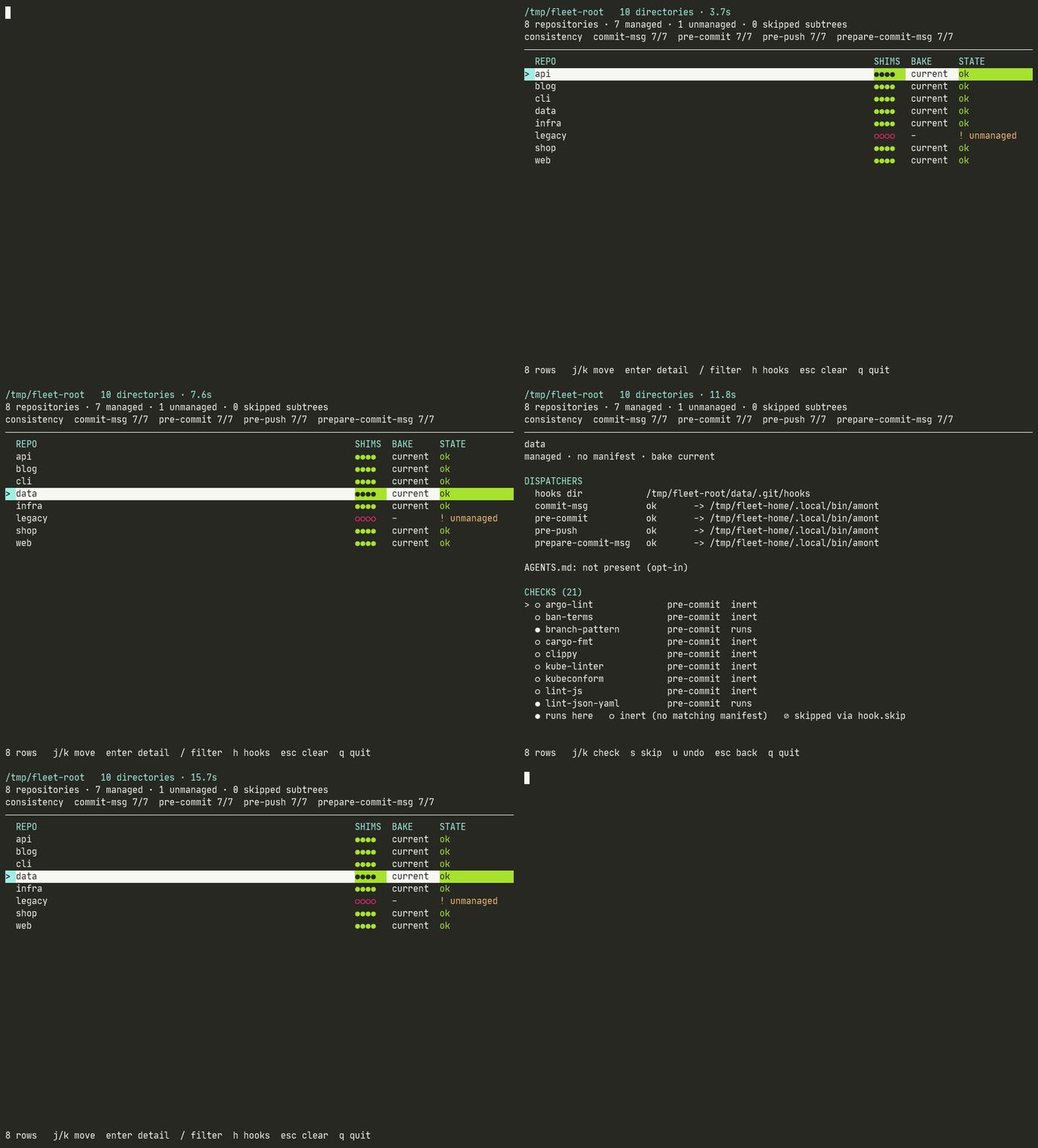
It answers the questions a directory full of repositories accumulates: which
repos are covered, which shims went stale after an upgrade, and which
repository is quietly carrying a hook.skip somebody forgot. Design record:
the fleet dashboard.
amont-fleet is a separate binary on purpose: it pulls ratatui, crossterm and
serde, and keeping the two apart is what stops "I wanted the dashboard" from
becoming "every commit now depends on a TUI library". The one-line installers
put both binaries in place; from crates.io it is its own
cargo install amont-fleet.
When another tool already owns the hooks
core.hooksPath redirects hook dispatch, and husky sets it. In a repository
that runs husky, git reads .husky/_ and never looks at .git/hooks at all —
so an install that wrote there would produce six files git never runs, and one
that wrote to .husky/_ would hand them to a directory husky's own prepare
regenerates on the next npm install.
Both are refused, by name:
✗ git dispatches hooks from /repo/.husky/_, not /repo/.git/hooks
    `core.hooksPath` is set, so husky owns the hooks here. Shims
    written to either directory would be overwritten or never run.
    Hand dispatch back first: git config --unset core.hooksPath
--force does not move it. That flag means "that file is mine to replace"; it
has never meant "write where git does not look".
This is not a blanket objection to core.hooksPath. A repository that
deliberately keeps its hooks in, say, tooling/hooks under version control has
chosen a location, not handed dispatch to something that will overwrite it, and
is installed into exactly as before. The refusal needs evidence: either the
destination belongs to a hook manager that regenerates it, or our shims are
already sitting in the repository's own hooks directory — which means amont was
installed here and something later took dispatch away.
amont uninstall deliberately does not refuse. Versions before this check
wrote shims into whatever core.hooksPath named, so it has to be able to reach
files that are already there.
--force, and what it will not do
amont install --force replaces a hook the installer would otherwise
refuse:
- one that is present but carries no marker of ours — somebody else's hook, or one you wrote;
- one that is a symlink, where writing normally would rewrite whatever it points at.
Without the flag, install names every such file and writes none of them.
--force is how you say the file is yours to replace, and the output then
names what it took rather than only counting what it wrote.
Two refusals --force does not override:
- A tracked file is never written. That is source belonging to a checkout, and it is the guard this project got wrong twice.
- A path that is a directory or a device is refused whatever you pass. That
is not "a hook that is there", it is a sign something else is going on, and
refusing costs you one
rm.
Neither ever deletes a hook it did not write. A pre-commit-* or pre-push-*
file in .git/hooks without our marker is reported and left exactly where it
is. amont-fleet --remove-unrecognized opts into removing them, and is
spelled that way rather than --remove-stale because "stale" means our own
retired shims, which are a different thing entirely.
Everywhere, forever — a real opt-in
$ amont enroll
One command: it puts the binary somewhere stable, populates the template
directory, and points init.templateDir at it — refusing, loudly, if that
key already points somewhere else. Add --conventions declared on a machine
that also clones other people's projects, so those get only the safety net;
the full story is Rolling out to a team. The manual
spelling, for anyone who prefers to see every write:
mkdir -p ~/.config/git
git clone https://github.com/fredericrous/amont.git ~/.config/git/git-templates
git config --global init.templateDir ~/.config/git/git-templates/templates
git config --global commit.template ~/.config/git/git-templates/message
Git copies that directory into .git/hooks on every init and every
clone, so from then on every repository you clone runs these hooks without
being asked again. That is the convenience, and it is worth having: you never
forget to install, and amont-fleet never shows you an uncovered repo.
It is also a standing grant, and worth stating in full. A cloned repository can
declare its own checks in amont.conf. With this key set, those
declarations are present in every repository you clone — including one you
cloned only to read — and are one amont trust away from running. They do
not run before that; see the trust model. But if you set this
key, trust deliberately, rather than letting installation be the moment you
decided:
amont trust          # show what this repo declares, and accept it
amont trust --show   # what is trusted here
Full reasoning: index fidelity and run modes §0.
3. Turn them off again
amont uninstall              # this repository
amont uninstall --binary     # …and remove the binary from ~/.local/bin
amont-fleet uninstall --root ~/Developer
Uninstall removes our six shims and nothing else. A hook you wrote
yourself is left alone and named in the output, whatever it is — a hook it
cannot even read is named too, rather than passed over in silence. hook.skip
and amont.severity are never touched, because those are your statements
about your repository, not ours.
It does forget its own bookkeeping, and says which parts it forgot: the
gate stamps and attestation notes, the bypass ledger, the version-skew
marker, the known-identity memo — each of which only ever said "amont
checked this", which stops being true once the hooks are gone — and the
amont.conf trust record. That last one is a deliberate choice: trust is
consent for a committed file to run commands, and uninstalling is a request
to stop running them, so a later reinstall asks again rather than silently
re-honouring a review from a year ago. Re-granting is one amont trust,
which shows you the file. amont-fleet uninstall now does the same sweep in
every repository it disarms, instead of leaving that bookkeeping behind in
all of them.
What no uninstall ever touches is work you have not committed: an
interrupted run's parked changes stay in $GIT_DIR/amont-held, and
amont restore keeps working after the hooks are gone.
It also takes the shims back out of the template directory, and — if
init.templateDir is still set — says so loudly, with the command to unset it.
Without that, an uninstall you believed had finished would leave every future
git clone re-installing the hooks. A template directory that is itself a
checkout of this repository is never deleted from; those files are tracked
source and belong to the checkout.
This is also why the documentation never tells you to run
rm $(git rev-parse --git-dir)/hooks/*. That glob deletes every hook in the
directory — including ones other tools installed and ones you wrote — in order
to remove six files that belong to us. amont uninstall exists precisely
so that removing our hooks never means removing yours.
For bypassing a single commit, or disabling one check without uninstalling anything, see opting out.
4. Keeping it up to date
Ordinary binary updates need nothing per repository: every shim points at the one binary, so replacing the binary reaches every repo at once.
curl -fsSL https://raw.githubusercontent.com/fredericrous/amont/main/install/install.sh | sh
Re-installing is only needed when the shim set changes — a hook added, removed or renamed:
cd <your-repo> && amont install        # re-bake the shims here
amont-fleet fix --root ~/Developer     # or see what the whole fleet needs
amont-fleet fix --apply --root ~/Developer
Windows
Everything works, with one setup difference: there is no symlink.
(The amont trust prompt reads the console directly — CONIN$, the
platform's /dev/tty — and Ctrl-C mid-check restores your parked
unstaged changes before dying, both same as unix.)
The one-liner for this platform is PowerShell:
irm https://raw.githubusercontent.com/fredericrous/amont/main/install/install.ps1 | iex
It writes amont.exe and amont-fleet.exe into
%USERPROFILE%\.local\bin, which is where the shims look — they try both
amont and amont.exe there, so a binary in that directory resolves
even in a shim whose path was never baked. CI runs this script on a real
Windows runner against a real published release, because a documented install
path nobody executes is one you find out about from a bug report.
To build it yourself instead — Git for Windows ships bash and coreutils but
not make:
cargo build --release
./target/release/amont install
On macOS and Linux ~/.config/git/git-templates is usually a symlink to the
checkout, so init.templateDir can point at a stable XDG path. Windows does
not create symlinks without Developer Mode or elevation, so point git straight
at the checkout:
git config --global init.templateDir 'C:/path/to/amont/templates'
Nothing else changes. The shims never need the symlink: they resolve the binary
at run time, trying $GIT_HOOKS_BIN, the baked path, ~/.local/bin/amont
and ~/.local/bin/amont.exe, then PATH. The installer detects the .exe
suffix on its own.